

Why IDML preparation belongs before translation
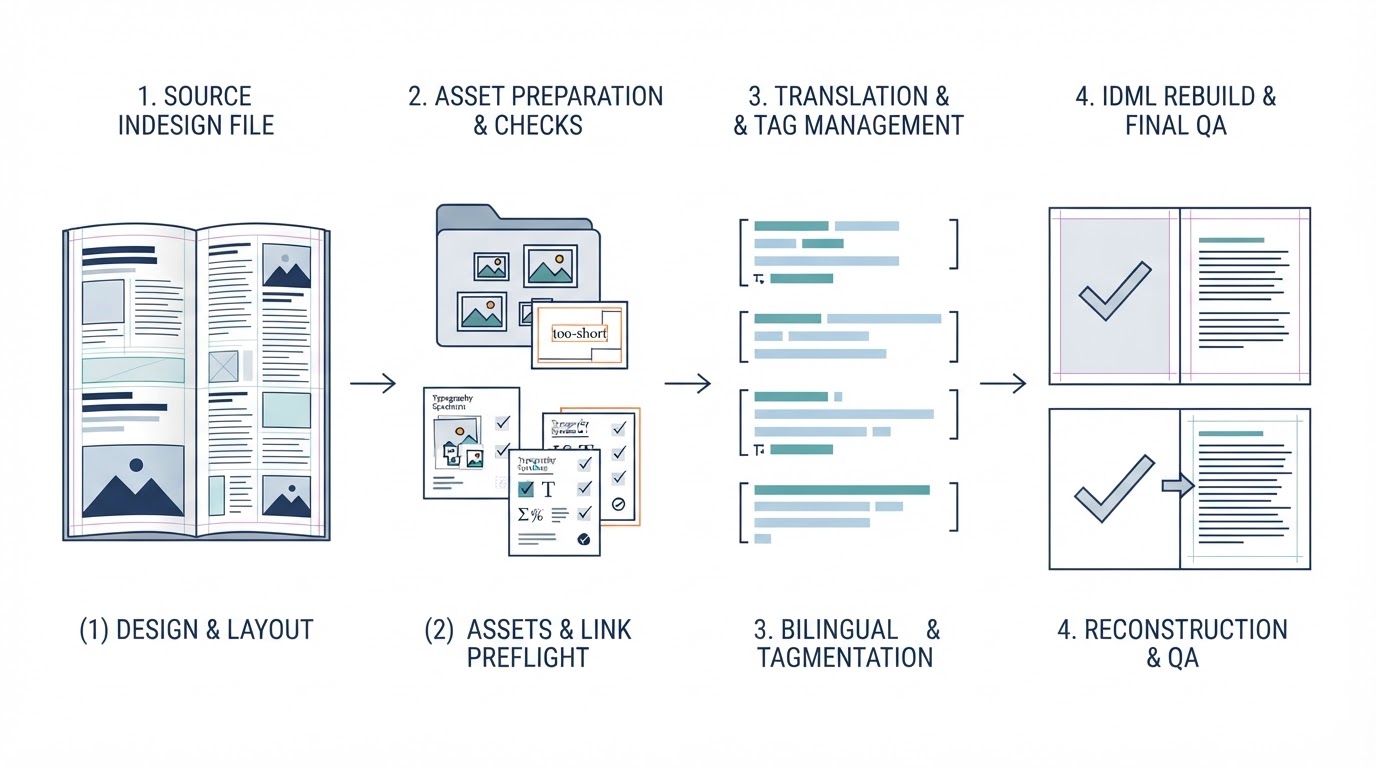
When a translation agency receives an Adobe InDesign package, the obvious deliverable may appear to be an IDML file. But exporting IDML is only one step in preparing a reliable localization workflow. An IDML package can open successfully in a CAT tool and still contain hidden production risks: overset text, missing fonts, disconnected stories, unresolved links, nontranslatable artwork, or styles that behave unpredictably when text expands. A useful preflight checks both the source publication and the translation workflow before any linguist begins work.
Start with the complete InDesign source package
Ask for the native INDD document, linked graphics, fonts where licensing permits, and any associated book files. InDesign’s Package feature can gather many dependencies and produce a report, but it is not a substitute for checking the delivered folder. Verify that links resolve, page count and trim size are correct, master-page elements are present, and the document opens without substitution warnings. Check whether the source includes placed PDFs or Illustrator files with editable text. Those graphics may require a separate translation path rather than disappearing from the scope.
Decide which text should enter the CAT tool
Not every visible word is part of an ordinary text story. Text may live in tables, anchored objects, footnotes, master-page items, captions, charts, or linked artwork. Review the publication page by page and classify what should be translated, retained unchanged, or handled in a separate editable asset. Running IDML through a CAT tool without this inventory can leave text outside the translation package. Conversely, bringing in unnecessary technical labels or decorative material can create avoidable segments. The agency should agree with its client on the treatment of URLs, product codes, legal references, and brand names.
Check overset text and story threading
Before export, use InDesign’s Preflight panel and inspect overset text, missing links, and font issues. Confirm that text frames are threaded in the intended reading order. Unusual threading can make segments appear out of sequence to translators, even if the publication looks fine. Review multi-column layouts, sidebars, pull quotes, and page-spanning stories. A deliberate visual reading order does not always match the order in which content is stored. Where the document uses independent frames for a single sentence, decide whether restructuring is feasible without disturbing the approved design.
Clean formatting without destroying meaning
InDesign character and paragraph styles are essential to consistent production, but direct formatting can proliferate into many small changes. A CAT-tool import may expose those changes as inline tags, depending on the filter and settings. Identify unnecessary overrides and repeated manual formatting while preserving superscripts, italics, symbols, nonbreaking spaces, hyperlinks, and other meaningful distinctions. Do not strip all formatting in pursuit of a tag-free file. A sensible goal is the smallest practical set of tags that accurately represents the source.
Export IDML and test the actual translation route
Save a versioned copy of the INDD file, then export IDML using the supported InDesign version. Open the exported IDML to confirm that it is structurally usable. Import a copy into the same CAT tool and file-type configuration the project will use. Inspect several representative segments: long paragraphs, headings, tables, captions, footnotes, inline formatting, and cross-references. Verify segmentation, tag density, and whether text from graphics or master pages is included as expected. A successful import alone is not evidence that the source is ready.
Plan for language expansion before delivery
English text may become substantially longer in another language, while other languages may require different line breaks or typographic conventions. InDesign’s layout is not automatically flexible enough to accommodate those changes. Identify narrow buttons, boxed warnings, tight table columns, fixed-height captions, and headings that already approach their frame limits. Establish whether the agency will adjust font size, tracking, line breaks, column widths, or page count during post-translation DTP. Record nonnegotiable brand and regulatory constraints before deciding which adjustments are permissible.
Handle medical and pharmaceutical layouts carefully
Clinical brochures, patient materials, safety leaflets, and other regulated documents often combine dense tables, footnotes, symbols, and reference citations. A single superscript marker can carry important meaning. Inspect decimal separators, units, footnote associations, nonbreaking spaces, Greek letters, and figure references. Preserve the relationship between a table entry and its explanatory note. The DTP team should flag ambiguous or unreadable source content rather than guess. Linguistic validation and medical review remain separate responsibilities from document reconstruction and layout QA.
Test the round trip, not just the export
For a representative copy, translate a small set of test segments or use clearly marked test strings, then generate the target IDML using the planned CAT workflow. Reopen it in InDesign. Check for missing text, broken styles, incorrect tag placement, damaged tables, overset frames, and linked-asset warnings. This round-trip test is especially valuable when the document uses complex anchored objects or advanced typography. It catches problems that neither the original layout inspection nor a CAT-tool preview will reveal.
Give project managers an actionable acceptance checklist
Before assigning translation, confirm the following: all source assets are accounted for; the INDD and IDML open; links and fonts are resolved or documented; the page and story inventory matches the intended scope; text is imported in logical order; formatting tags are manageable and meaningful; test segments export correctly; and expansion-sensitive areas are recorded for post-translation DTP. Keep a short issue log with page numbers and screenshots of genuine source problems. A clearly documented exception is more useful than an unexplained conversion that merely looks complete.
Build post-translation DTP into the schedule
Even well-prepared IDML normally needs a final layout pass after translation. Translators should not be expected to solve every line break, overflow, image-label, or pagination problem inside a CAT tool. Plan time for rebuilding target-language layouts, checking fonts and hyphenation, reviewing links, inspecting tables, and exporting final PDFs. Then compare the target publication against the approved source and translated content. A polished final PDF and a clean underlying translation workflow are complementary goals, not interchangeable ones.
Request an IDML workflow assessment
If your agency handles InDesign brochures, technical manuals, or multilingual medical publications, DTP Ready can assess the source package and recommend practical preparation and post-translation checks. Explore our DTP services, see how we support translation agencies, or request a quote with a representative non-confidential sample and your target languages.

Pingback: Post-Translation DTP: How to Handle Text Expansion Without Breaking Layouts - DTP Ready